Play Duck River on Your Phone - Android, iOS and PWA

Built for mobile from day one. Duck River runs on any smartphone with a modern browser. Native apps, PWA, or straight in the browser - pick the method that works for you.

Android APK
iOS App
PWA
Browser
LIVE
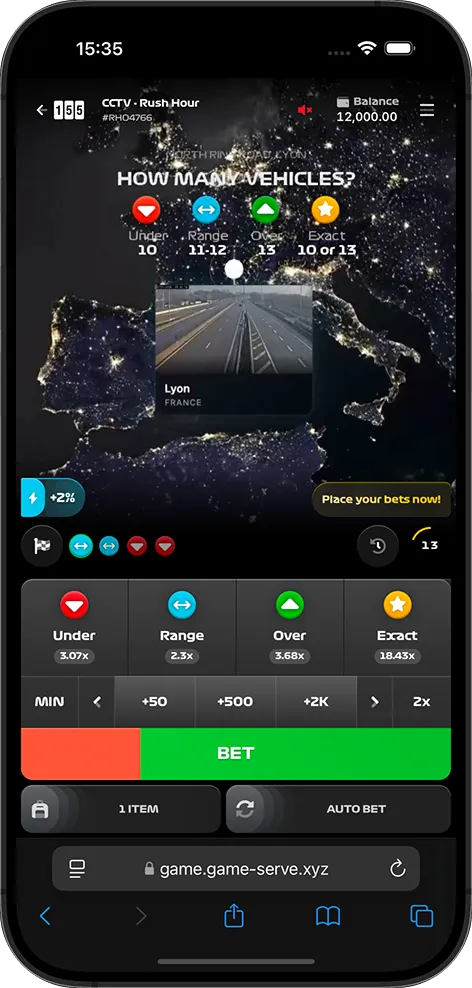
Duck River mobile interface on smartphone - live waterway camera with duck counting AI

Duck River Mobile: How to Play on Smartphone & Tablet (2026)

155.io designed Duck River as a mobile-first game. The interface, the live video feed, the betting panel, the AI overlay - every element was optimized for smaller screens before being adapted to desktop. That means mobile is not a compromise here. It is the primary platform.

The game runs in 55-second rounds. Quick enough for a commute, a lunch break, or five minutes of downtime. The short format is a natural fit for phones, and the touch controls make placing bets faster than clicking with a mouse.

You can access Duck River on mobile through four methods: a native Android app (APK), an iOS app (via the App Store through partner casinos), a Progressive Web App (PWA), or directly in your mobile browser. Each method has its advantages depending on your device and preferences.

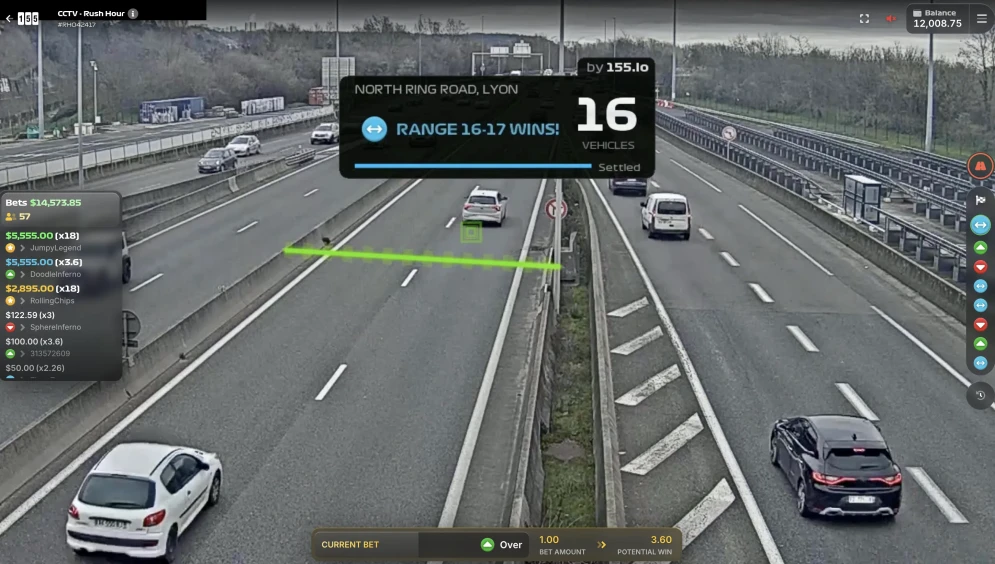
The live waterway camera feed adapts its resolution to your connection speed. On a solid Wi-Fi or 4G signal, you get a crisp HD stream of the canal or river. On a weaker connection, the video adjusts automatically without dropping frames or freezing.

Duck River mobile gameplay - AI detection overlay on a smartphone screen showing ducks on a canal

Duck River APK for Android: Download & Installation Guide

Duck River is not listed on the Google Play Store. Google restricts real-money gambling apps from its marketplace in most regions, so partner casinos distribute their own APK files that include Duck River alongside their full game library.

The process is straightforward:

1

Visit the casino website

Go to your preferred partner casino (Stake, Roobet, Shuffle) on your Android phone's browser. Look for the "Download App" or "Android" section.

2

Download the APK

Tap the download link. Your browser may warn you about installing from unknown sources - this is normal for any APK outside the Play Store.

3

Enable unknown sources

Go to Settings > Security > Install Unknown Apps and allow your browser to install APKs. On newer Android versions, this prompt appears automatically.

4

Install and play

Open the downloaded APK file, confirm the installation, and launch the app. Duck River will be in the game library. Log in or create an account and start playing.

The Android APK weighs under 50 MB for most partner casinos. It includes push notifications for promotions, a quicker launch time compared to the browser, and the ability to stay logged in between sessions.

The APK is safe as long as you download it directly from the official casino website. Do not install APKs from third-party download sites or forums. Always verify the URL before tapping download.

Duck River on iPhone: How to Play on iOS via Safari

Apple's policies on gambling apps are stricter than Android, but several partner casinos have managed to get their apps approved on the App Store in licensed jurisdictions. If a casino app is available in your country's App Store, Duck River will be part of the game catalog inside it.

To find the app, search for the casino name directly on the App Store (for example, "Stake" or "Roobet"). If the app appears in your region, download it and navigate to the live games or 155.io section to find Duck River.

If the native app is not available in your region, the PWA route is the best alternative for iPhone and iPad users. Safari on iOS supports PWA installation natively, and the experience is nearly identical to a native app.

PWA Installation on iOS (Safari)

1

Open Safari

Navigate to the partner casino website using Safari. This only works with Safari - Chrome and Firefox on iOS do not support PWA installation.

2

Tap the Share button

Tap the share icon at the bottom of the Safari toolbar (the square with an upward arrow).

3

Add to Home Screen

Scroll down in the share menu and tap "Add to Home Screen." Name the shortcut and confirm.

4

Launch like an app

The casino icon now sits on your home screen. Tap it to open directly into the game. No Safari toolbar, no address bar - it looks and feels like a native app.

The PWA on iOS retains your login, loads quickly, and runs Duck River's live feed without any difference from the browser version. The only limitation: push notifications are supported starting from iOS 16.4 and later.

Duck River PWA: Install as a Native App Without App Store

The PWA is the most universal way to get Duck River on your home screen. It works on both Android and iOS, requires no app store, no APK download, and no storage commitment beyond a few megabytes. It is essentially a bookmark on steroids - a web page that behaves like a native application.

When you install the PWA, the game opens in its own window without browser navigation bars. It feels native. You get a home screen icon, a splash screen on launch, and (on Android) push notifications for promotions and new features.

PWA Installation - Android (Chrome)

  • Open the partner casino website in Chrome
  • Look for the "Install" banner at the bottom of the page, or tap the three-dot menu in Chrome
  • Select "Install app" or "Add to Home Screen"
  • Confirm the installation - the icon appears on your home screen
  • Open it and log in to access Duck River

PWA Installation - iOS (Safari)

  • Open the partner casino website in Safari (not Chrome)
  • Tap the Share icon (square with upward arrow)
  • Scroll down and select "Add to Home Screen"
  • Name the shortcut and tap "Add"
  • Open from your home screen - no Safari toolbar, full-screen experience

Why choose PWA over a native app? No APK to manage, no App Store restrictions, no storage overhead. The PWA always runs the latest version of the casino platform automatically. If you value simplicity, the PWA is the cleanest option.

Play Duck River in Your Browser: No Download Required

If you prefer zero installation, Duck River runs perfectly in your mobile browser. No download, no shortcut, no setup. Open the casino website, log in, find Duck River, and play.

The game is fully compatible with the three major mobile browsers:

🌐

Google Chrome

The most widely used mobile browser. Duck River runs smoothly on Chrome for Android and iOS. Hardware acceleration and WebRTC support make the live feed responsive.

🧭

Safari

The default browser on iPhone and iPad. Full support for the Dolby Millicast stream. Also the only iOS browser that supports PWA installation.

🔥

Firefox

Strong privacy features and solid video playback. Duck River is compatible with Firefox on Android. On iOS, Firefox uses the WebKit engine like Safari.

Browser play is ideal for casual sessions or when you want to try the game without any commitment. The live feed, the AI overlay, the betting interface - everything works the same as in the app or PWA versions.

The only trade-off: you cannot receive push notifications, and the browser toolbar takes a small portion of screen space. For dedicated players who play regularly, the PWA or native app gives a cleaner full-screen experience.

Android

Download the partner casino APK directly from their website. Includes push notifications, fast launch, and auto-login. Works on Android 10 and up.

Get APK

iOS

Check the App Store for your casino's native app. If unavailable in your region, the PWA through Safari is the recommended alternative. Requires iOS 15 or later.

Play on iOS

PWA

Works on both Android and iOS. Installs from the browser in seconds. Home screen icon, full-screen mode, no app store needed. Always up to date.

Install PWA

App vs PWA vs Browser: Which Is Best for Duck River?

All three methods give you the full Duck River experience. The live feed, the AI detection, the four bet types, the payouts - nothing changes between them. The differences are about convenience, speed, and small details.

Feature Native App PWA Browser
Installation APK (Android) / App Store (iOS) From browser menu None
Home screen icon Yes Yes No (bookmark only)
Full-screen mode Yes Yes No (browser toolbar visible)
Push notifications Yes Android: Yes / iOS 16.4+ No
Auto-login Yes Session-based Session-based
Storage used 30-50 MB Under 5 MB Cache only
Auto-updates Manual (APK) / Auto (App Store) Automatic Automatic
Live feed quality Identical Identical Identical
Best for Daily players Regular players Casual or first-time players

Our recommendation: start with the browser to test the game. If you play regularly, install the PWA - it takes 10 seconds and gives you a clean, full-screen experience. The native app is worth it if you play daily and want push notifications for promotions.

Duck River gameplay on multiple devices - desktop, tablet, and smartphone showing live waterway feed

Minimum Requirements to Play Duck River on Mobile

Duck River is lightweight by design. The game itself runs server-side - your phone only needs to display the live video feed and handle the betting interface. That said, a few minimum requirements ensure a smooth experience.

📱

Device

Any smartphone from 2020 or newer. iPhone 8 and up, or any Android phone with 3 GB of RAM. Tablets work perfectly too - the larger screen gives you a better view of the waterway feed.

Operating System

iOS 15 or later for iPhones and iPads. Android 10 or later for Android devices. Older versions may work but are not officially supported by partner casinos.

📶

Connection

Stable 4G or Wi-Fi. The live video feed consumes about 1-3 MB per minute depending on resolution. A 55-second round uses roughly 1-2 MB of data. 5G or fiber Wi-Fi gives the best visual quality.

Duck River does not require a high-end phone. The heavy work - AI detection, video encoding, result verification - all happens on 155.io's servers. Your device only streams the video and sends your bet selections. Even a mid-range phone from three years ago handles it without lag or overheating.

3 GB
Minimum RAM
4G+
Connection Speed
2020+
Device Year

Dolby Millicast: The Streaming Tech Behind Duck River's Live Feeds

The live video feed in Duck River is powered by Dolby Millicast, a real-time streaming technology built for sub-second latency. In practical terms: what happens on the waterway camera reaches your phone screen in under one second.

This matters because Duck River is a live prediction game. If the video had a 5 or 10-second delay like standard live streams, you could see ducks entering the zone before the round timer reflects it. Dolby Millicast eliminates that gap. What you see is what is happening right now.

The technology adjusts video quality dynamically based on your connection. On a fast Wi-Fi, the feed runs at full resolution. On a slower 4G connection, it scales down the bitrate without interrupting playback. You never get a loading spinner or a frozen frame mid-round.

Standard WebRTC protocols handle the communication between the server and your device. This means no special plugin or app is needed - any modern browser supports it natively. Chrome, Safari, Firefox all work out of the box.

< 1 second
End-to-end video latency with Dolby Millicast

For players on mobile, Dolby Millicast is the reason Duck River feels responsive even on a phone screen over cellular data. The stream adapts, the latency stays low, and the AI overlay renders in real time on top of the video. No matter how you access the game, the underlying streaming tech is the same.

Want to see which casinos offer Duck River with the best mobile experience? Check the full casino comparison page.
Duck River Mobile FAQ: App, PWA & Compatibility Questions

Yes. Duck River was designed mobile-first. You can play on any modern smartphone through four methods: the Android APK, the iOS app via the App Store, the PWA installed from your browser, or directly in your mobile browser. All four methods give you the exact same game with live waterway cameras and AI detection.

Duck River is not on the Google Play Store. Partner casinos like Stake, Roobet, and Shuffle provide their own Android apps as APK files. Visit the casino website on your phone, find the "Download" or "Android" section, download the APK, allow installation from unknown sources when prompted, and install. The full game library including Duck River will be available inside the app.

Some partner casinos have iOS apps approved on the App Store in certain countries. Search for the casino name (Stake, Roobet) on the App Store. If available in your region, download it - Duck River is part of the game catalog. If the app is not in your App Store, use Safari to install the PWA for a near-native experience on your iPhone.

The PWA (Progressive Web App) is a lightweight version that installs directly from your browser without going through any app store. On Android, open the casino site in Chrome and tap "Install" when prompted (or use the three-dot menu). On iOS, open the casino site in Safari, tap the Share icon, then "Add to Home Screen." The PWA gives you a home screen icon, full-screen mode, and fast loading - very close to a native app experience.

Duck River works on both 4G and Wi-Fi. The Dolby Millicast streaming technology adapts the video quality to match your connection speed. A stable 4G signal provides a smooth experience. Wi-Fi and 5G give the best visual quality. Each 55-second round uses about 1-2 MB of data, so even limited data plans can handle multiple sessions.

Any smartphone from 2020 or newer will run Duck River without issues. The requirements are modest: iOS 15+ or Android 10+, 3 GB of RAM, and a stable 4G or Wi-Fi connection. The game runs server-side, so your phone only handles the video stream and the betting interface. No high-end hardware needed.

No. The mobile and desktop versions are the same game with the same live cameras, the same AI detection, the same bet types, and the same payouts. The only difference is the layout: the mobile interface is optimized for touch controls and smaller screens. The desktop version shows a larger video feed, which can help you spot ducks earlier. Both versions use the same Dolby Millicast stream.

Yes. Your account is tied to the casino platform, not to a specific device. You can start a session on your phone, close it, and continue on your desktop - or the other way around. Your balance, bet history, and account settings sync across all devices. Just log in with the same credentials.

Play Responsibly

Mobile access makes Duck River available anywhere, anytime. That convenience also means it is easier to play longer than intended. Set clear limits before you start a mobile session.

Duck River runs at over 60 rounds per hour. On a phone, the quick touch-to-bet format can accelerate the pace even further. Be mindful of your time and your budget.

Mobile-specific advice:

  • Set a session timer - use your phone's built-in timer or the casino's session limit feature
  • Disable auto-login if you find yourself opening the app too often out of habit
  • Use deposit limits - all licensed partner casinos let you set daily, weekly, or monthly caps
  • Take breaks - the 55-second rounds make it easy to lose track of time on a phone
  • Do not play while distracted - commuting or multitasking increases impulsive betting

Licensed partner casinos provide responsible gambling tools: deposit caps, loss limits, session timers, cooling-off periods, and full self-exclusion. Configure these tools before your first mobile session.

Need help? GambleAware - www.BeGambleAware.org | GamCare - 0808 802 0133

Duck River Goes Where You Go

Android APK, iOS App Store, PWA, or straight in your browser. Four ways to play the live duck counting game from your pocket. Same cameras, same AI, same x18 payout.

Mobile-first design
Dolby Millicast
4G compatible
PWA ready
Duck River - Play on Mobile
Android, iOS, PWA - live duck counting on your phone
Play Now